
Android HTTP Error Handling & Status Code Issues
What is HTTP(s) issue in Android apps?
HTTP(s) issues in Android applications refer to problems that arise when there is an error in the communication between an Android app and a web server using the HTTP(s) protocol. These issues can impact the app's functionality and the user experience.
There are several types of HTTP(s) failures that can occur in Android apps, including connections errors, status code errors, delayed calls, and duplicate calls. It is essential for developers to monitor network communications to detect and resolve these issues to ensure a smooth and functional user experience.
Why does this happen?
HTTP(s) issues in Android applications can arise due to various reasons. Understanding these causes can help developers identify and address problems more effectively. Some of the common reasons for HTTP(s) issues are as follows:
Connection Errors: These errors occur when there is a problem establishing a connection between the Android app and the server. This can be due to incorrect server addresses, unsupported SSL/TLS configurations, or incorrect network settings such as proxy and firewall configurations.
Delayed Calls: These issues occur when the app does not receive a timely response from the server. This can be due to high server load, long-running operations on the server, or network latency caused by poor connectivity or congested networks.
Authorization Errors: These errors occur when the app attempts to access resources on the server without proper authentication or authorization credentials. This can be due to incorrect user credentials, expired tokens, or insufficient permissions for the requested resources.
Server Errors: These errors occur when there is an error on the server side. This can be due to server crashes, incorrect server configurations, server-side software bugs, or server overload leading to unresponsive or slow behavior.
Duplicate Calls: Executing duplicate HTTP(s) calls can have several negative impacts on the performance, network usage, and battery life of the device. These can be caused by redundant requests, unintended retries, or improper implementation of caching mechanisms.
How to fix it using Appxiom
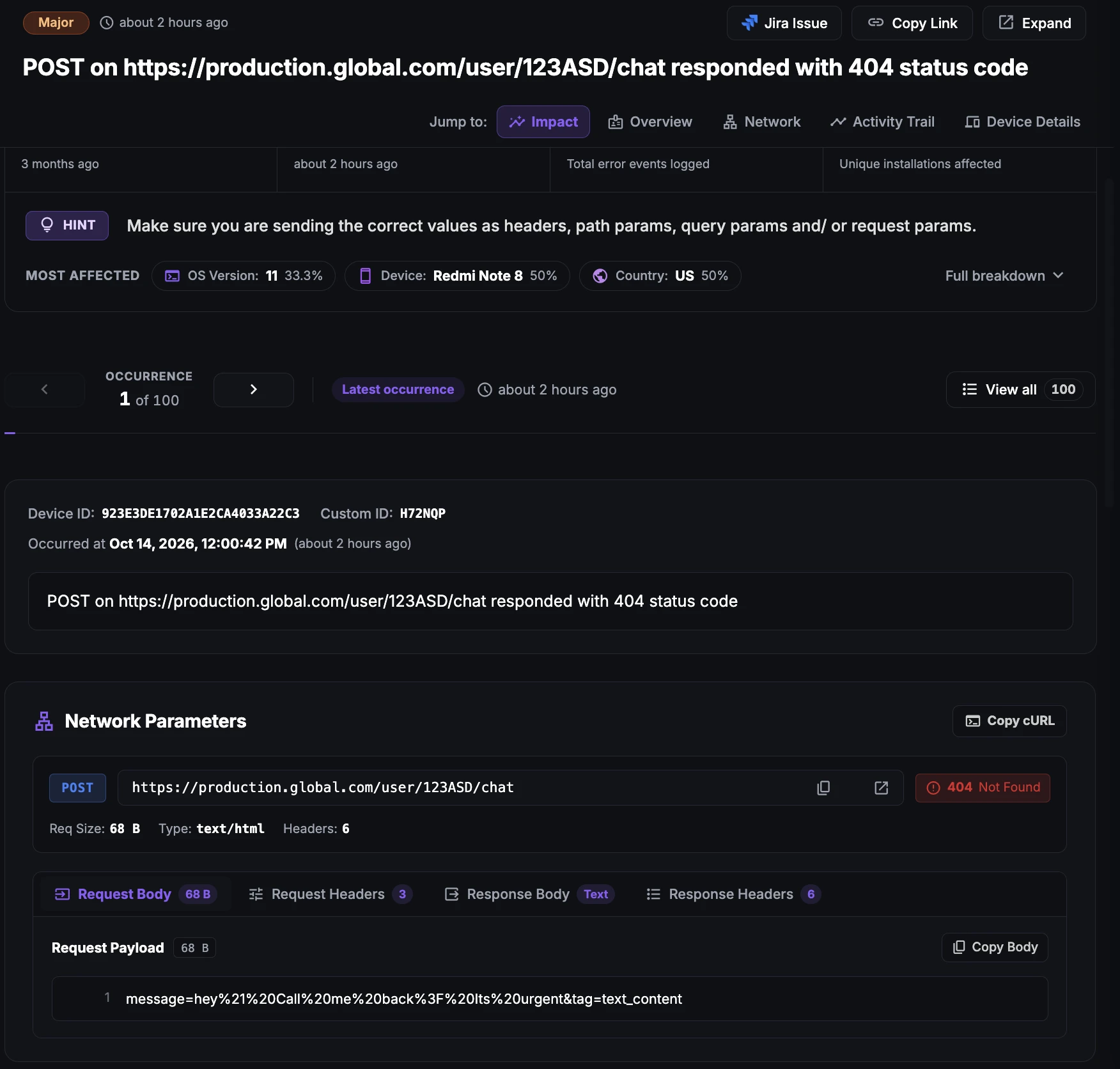
- Locate issue report: The issue report provides data points such as the full URL of the HTTP(s) call, URL parameters, status code, request and response headers, and request and response body. These data points help developers identify and fix HTTP(s)-related issues in Android applications.
Stop guessing. Start fixing.
Get real-time alerts, exact stack traces, and complete activity trails before these issues impact your revenue.
Related Issues & Failure Guides
Detecting and fixing ANR (App Not Responding) in Android apps
Detect Android ANR issues and main-thread UI freezes in real time. Appxiom helps engineering teams identify, prioritize, and resolve ANRs before user churn.
Detecting and Fixing Cold Start Delay in Android Apps
Detect and fix cold startup bottlenecks to accelerate Android launch speed. Analyze launch-time traces, init dependencies, and startup delays effectively.
Detecting and fixing Crashes in Android apps
Monitor and fix Android app crashes in real time. Appxiom captures full stack traces, device state, and user trails to accelerate root cause debugging.
We use cookies to improve your experience.