

Android
How to Avoid Energy Bugs Caused by Wake Lock in Android Apps.
Wake locks keep the CPU or screen awake, and misused ones drain the battery. Learn how to avoid wake lock energy bugs in Android apps.
Don Peter5 min read
Android guides for Kotlin and Jetpack Compose developers. Learn to detect and fix ANRs, frozen frames, memory leaks, crashes and slow startup, with practical Gradle, WorkManager and Android Vitals techniques.
115 articles, newest first. Page 10 of 10.
Wake locks keep the CPU or screen awake, and misused ones drain the battery. Learn how to avoid wake lock energy bugs in Android apps.
Don Peter5 min read

Avoid ANRs in Android apps by keeping the UI thread light and moving work that takes longer than 16 ms to worker threads. Here is how.
Don Peter4 min read
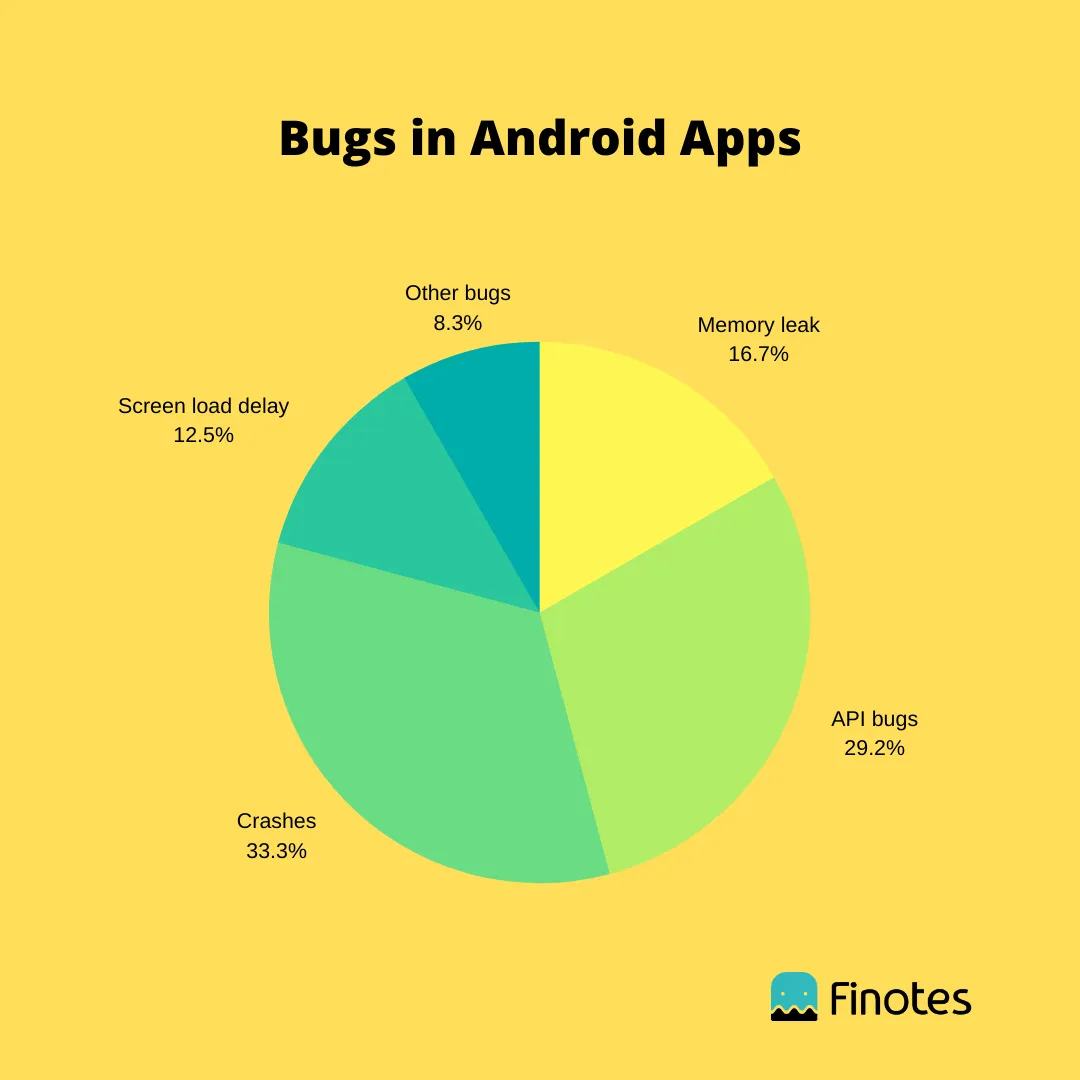
The most common Android app bugs: crashes (33.3%), API call bugs (29.2%), memory leaks (16.7%) and delayed screen loading (12.5%).
Don Peter1 min read

Appxiom detects and reports abnormal memory usage and memory spikes. Of course it detects memory leaks as well.
Don Peter4 min read

Crashes can create a dent in user experience which might trigger users to uninstall the app. Appxiom helps to detect crashes and fix them fast.
Don Peter2 min read

Memory leaks lead to OutOfMemory crashes with useless stack traces. Appxiom detects leaks in Activities and Services, down to the object in debug.
Don Peter3 min read

This happened when I was working on the abnormal memory usage tracking feature in Android SDK for Appxiom.
Don Peter3 min read
Appxiom traces silent failures, frozen frames and broken user journeys back to the code that caused them, and shows what each one costs. Bring that context into your AI coding agent with the Appxiom MCP Server and Agent Skills.