
Fix HTTP(s) Issues in Kotlin Multiplatform Apps
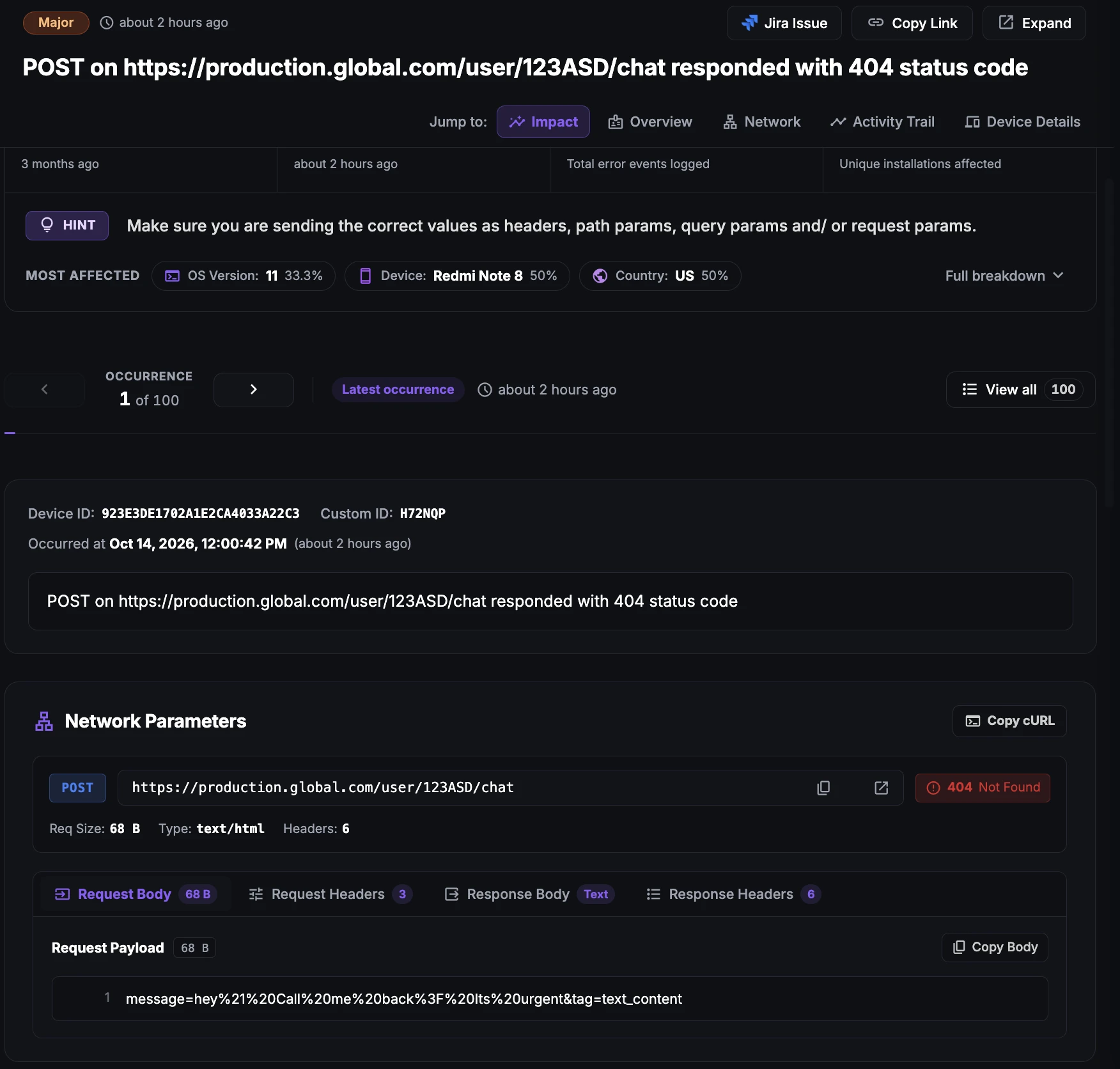
HTTP(s) issues in KMP apps
HTTP(s) issues are failures in the data exchange between the app and its servers. Most Kotlin Multiplatform (KMP) apps make their API calls from shared code using the Ktor client, which runs on the OkHttp engine on Android and on the Darwin or CIO engine on iOS.
The most common HTTP(s) issues are connection errors, where the app cannot reach the server; status code errors such as 401, 404 or 500; delayed calls, where the response arrives much later than expected; and duplicate calls, where the same request is sent more than once.
Because the networking layer is shared, one broken endpoint or bad request can affect both the Android and iOS apps, but the failure may show up differently on each engine.
Why does this happen?
HTTP(s) issues in KMP apps usually come from:
Connection errors: No network, DNS failures, dropped connections or wrong base URLs in configuration.
Delayed calls: Slow backend endpoints, large payloads, or engine timeouts that differ between Android and iOS.
Authorization errors: Expired or missing tokens, or headers set on one platform but not the other.
Server errors: Backend crashes, misconfiguration or overload returning 5xx responses.
Duplicate calls: Retries, repeated recomposition or multiple collectors of the same flow firing the same request again.
Serialization mismatches: Responses that no longer match the shared data models.
How to fix it using Appxiom
- Locate issue report: The issue report shows the full URL, status code, duration, and request and response headers and body. Sensitive headers can be masked with
Observe.setMaskedHeaders. - Group dynamic endpoints: Use
Observe.setUrlPatternsso calls like/users/123and/users/456are reported as one endpoint. - Set it up: Install
AppxiomKtorPluginin your sharedHttpClientand, for the iOS Darwin engine, add theAXsettings toInfo.plist, as described in Network Monitoring for KMP.
Stop guessing. Start fixing.
Get real-time alerts, exact stack traces, and complete activity trails before these issues impact your revenue.
Related Issues & Failure Guides
Fix Crashes in Kotlin Multiplatform Apps
Detect crashes from shared Kotlin code on Android and iOS, including uncaught coroutine exceptions and Kotlin/Native crashes, with full stack traces and trails.
Fix ANR in Kotlin Multiplatform Apps (Android)
Detect ANRs in the Android build of KMP apps. Find runBlocking calls, main-dispatcher work and slow I/O in shared code that freeze the UI thread.
Fix App Hangs in Kotlin Multiplatform Apps (iOS)
Detect main-thread hangs in the iOS build of KMP apps. Pinpoint blocking calls from Swift into shared Kotlin code and slow Compose Multiplatform rendering.
We use cookies to improve your experience.